Tap Music 3D
Tap LabMusic
4.34.51K Reviews
- Version
- 2.2.0
- Installs
- 5.00M
- Age Rating
- Everyone
Screenshots
Our Review of Tap Music 3D
 Analysis by Appyee
When I want a quick game that gives music my full attention for a few minutes, a rhythm title can be a better fit than a long level-based adventure. Tap Music 3D is built around that simple appeal: listen, watch the notes approach, and tap in time. Its focus on popular music and direct touch controls makes it easy to understand, though the timing challenge gives it more to offer than a casual button-mashing game.
A rhythm game built around timing
The central idea is straightforward: match your taps to the music as notes reach the target area. What makes that enjoyable is the small gap between knowing the beat and actually hitting it consistently. I found that paying attention to the song, rather than staring only at the moving notes, helps the taps feel more natural. It also makes a missed beat easier to understand: sometimes the issue is not speed, but anticipating the rhythm incorrectly.
That focus gives the game a different feel from music apps that ask you to build playlists or simply listen. It is an active way to engage with a track, and each attempt asks for concentration as well as a sense of timing. If you already enjoy rhythm games, the appeal is immediate; if you are new to them, the one-touch premise gives you a low-pressure way to see whether the format clicks.
What a short session feels like
I would treat each song as a compact focus break rather than background entertainment. On a commute, during a quiet wait, or between other tasks, a short session gives me something specific to do without requiring a long story or complicated controls. The trade-off is that the game needs my attention: it is not the best choice if I want music playing while I read, talk, or work.
A useful habit is to settle into the beat before trying to chase a better result. On a first attempt, I concentrate on the pulse and let my hands follow; on a replay, I can pay closer attention to where I tend to tap early or late. That makes practice feel purposeful instead of simply repeating a song. It also helps distinguish a track that suits my sense of rhythm from one that takes more getting used to.
Getting Into the Groove
First off, you’ll find that Tap Music 3D is super intuitive. As soon as you fire it up, you’re greeted with a slick interface that’s both inviting and straightforward. The vibrant colors and smooth transitions make it feel like the developers put a lot of TLC into the design.
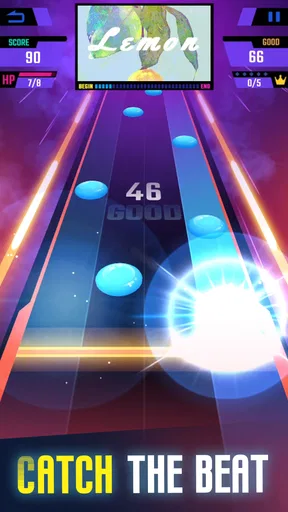
The game is all about tapping to the beat of the music. Sounds simple, right? But trust me, once you get started, you’ll quickly realize it’s a test of your rhythm and reflexes. You tap to the beat of popular songs, and the difficulty ramps up as you progress. It’s kind of like a dance party in your pocket!
Features That Make You Tap
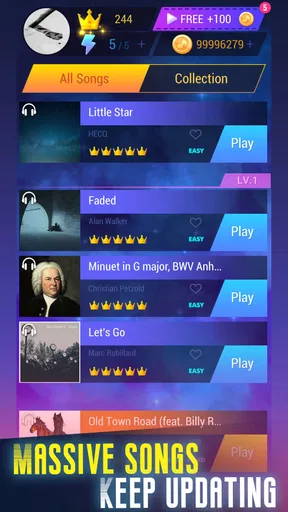
One of the standout features of this game is its extensive music library. There’s a wide array of genres to choose from, so whether you’re into pop, rock, or electronic, there’s something for everyone. And the best part? They keep updating the library, so you’ll never get bored.
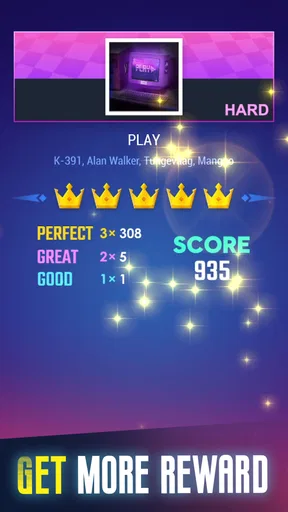
The game also supports both offline and online play. So, if you’re stuck somewhere without Wi-Fi, no worries! You can still groove to your favorite tracks. Plus, there’s a competitive aspect with leaderboards. Seeing your name climb up the ranks is a satisfying reward for your tapping prowess.
Playing well without turning every round into a grind
Leaderboards add a reason to revisit a track, but I would treat them as a personal progress marker first. A ranking can be motivating when I want to improve, yet chasing other players can make a relaxed music break feel like work. I get more out of replaying a song with one clear aim—keeping steadier time, for example—than repeating it indefinitely for a better position.
For an offline session, it is sensible to open the game and make sure the track you want is available before you lose connectivity. Offline play is useful when a network is unreliable, but it should not be taken as a guarantee that every online feature will behave the same way without a connection. I would also choose a song before settling into a crowded commute: once a round begins, looking around the interface is less convenient than keeping my attention on the beat.
The Gameplay Experience
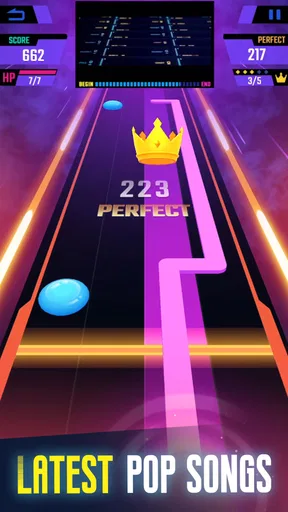
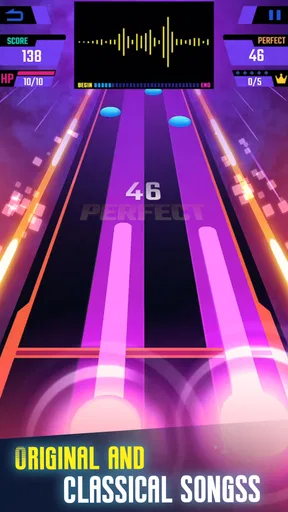
Now, let’s talk about gameplay. The controls are as simple as they come. You tap on the screen when the notes hit the bottom. But don’t be fooled by the simplicity. The real challenge lies in staying in sync with the song’s rhythm. It’s not just about quick fingers; you need to feel the music. That’s where the magic happens! 🎵
As you progress, the levels become more intricate with faster beats and complex patterns. There’s a real sense of progression and accomplishment as you master each song. It’s addictive, and you’ll find yourself saying, “Just one more song!”
Why the visual presentation matters
The 3D presentation gives the notes and movement a more lively feel than a plain list of timing prompts. That is a nice match for a game where visual cues and audio have to work together, but it also means the screen is part of the challenge. If the display feels visually busy to you, focus on the approach of the notes and the beat instead of trying to take in every effect. I find that narrowing my attention makes the game feel less cluttered and helps me keep a steadier rhythm.
Sound matters more than spectacle here. A quiet environment or headphones can make it easier to hear the pulse, while playing through a phone speaker in a noisy place may make precise timing harder. I would not assume that a stronger visual effect can compensate for not hearing the song clearly; the game is most satisfying when I can use both the sound and the moving notes as cues.
Visuals and Soundtrack
Visually, Tap Music 3D is a treat. The 3D graphics are crisp and vibrant, adding an extra layer of immersion. The developers have done a fantastic job of ensuring that the visuals complement the music. Each tap is accompanied by a satisfying visual effect that makes you feel like you’re part of the song.
The soundtrack is, of course, the heart of the game. The quality of the audio is top-notch, and it’s clear that a lot of effort went into selecting and curating the tracks. Whether you’re playing with headphones or through your phone’s speakers, the sound is full and rich.
How it compares with other ways to play with music
Compared with a music streaming app, this is not a substitute for choosing a playlist and letting it run. I have to interact with the screen, so it suits a deliberate break rather than a background soundtrack. Compared with rhythm games that rely on more elaborate controls, its tapping approach is easier to pick up, though players looking for a deeper control scheme may prefer a different kind of music game.
It also sits between casual tapping and score-focused play. The songs give each round its own pace, while progression and leaderboards provide reasons to return. That combination works best if I enjoy improving through repetition. If I mainly want to discover artists or control exactly what I hear, a dedicated music service is the better tool; if I want a demanding rhythm challenge, a more complex rhythm title may be a better match.
Who is likely to enjoy it—and who may not
I would recommend it to someone who likes popular music, wants a game they can understand quickly, and enjoys gradually getting more accurate. It is also a reasonable pick for short breaks because a song gives a session a natural endpoint. The game is free to start, is rated for Everyone, and comes from Tap Lab. Its current version is 2.2.0, and it runs on Android 6.0 or later.
Someone who dislikes tapping games, finds repeated attempts frustrating, or wants a music experience that can run unattended may be happier elsewhere. The same goes for a player who expects every track to match their personal taste: a broad selection is not the same as a guarantee that every song will be a favorite. I would try a few different tracks before deciding whether its rhythm and song choices suit me.
Cost, expectations, and practical fit
The game is free, with in-app purchases ranging from $2.99 to $29.99 per item. I would begin without spending and see whether the available play and music are enough for my routine. If a purchase is offered, I would check what it changes before paying rather than assuming it unlocks a particular song or removes a specific obstacle. That keeps the decision tied to what I actually want from the game.
Its audience is substantial, with over 5 million installs, an average rating of 4.3 from around 32 thousand ratings, and roughly 4.5 thousand written reviews. Those figures can help set expectations, but they cannot tell me whether its songs or timing style will suit me personally. I would use the first few sessions to judge those things instead of treating popularity as proof that it is the right rhythm game for everyone.
Why You Should Download It
So, why should you give Tap Music 3D a shot? Well, if you love music and enjoy rhythm games, it’s a no-brainer. It’s a game that’s easy to pick up but challenging to master, offering endless hours of entertainment. Plus, it’s a great way to discover new music!
With regular updates, a growing music library, and competitive gameplay, there’s always something new to explore. It’s perfect for quick sessions or long playthroughs, making it a versatile addition to your app collection.
In summary, Tap Music 3D is a must-try for any music game enthusiast. It’s engaging, fun, and a fantastic way to pass the time. So, what are you waiting for? Get your fingers ready and start tapping!
Verdict
Strengths of Tap Music 3D
- Engaging rhythm-based gameplay.
- Wide variety of popular songs.
- Intuitive touch controls.
- Stunning 3D graphics.
- Regular updates with new content.
Limitations of Tap Music 3D
- Occasional in-app purchase prompts.
- Limited offline play options.
- Ads can be intrusive.
- Song selection may vary by region.
- High battery consumption.
Similar Picks in This Category
View All
Tiles Hop Music & Ball Game
AMANOTES PTE. LTD.4.3

Magic Tiles 3™ - Piano Game
AMANOTES PTE. LTD.4.6

Real Piano
Bilkon3.7

Piano Game: Classic Music Song
Dream Tiles Piano Game Studio4.0

Smash Colors: Music Ball Rush
BADSNOWBALL HONGKONG LIMITED4.2

Piano Music Go-EDM Piano Games
Joy Journey Music Games4.5
Frequently Asked Questions
What is Tap Music 3D and how does it work?
Tap Music 3D is a rhythm-based music game available on Android and iOS platforms. Players tap on the screen in time with the music to score points. The game features a variety of songs across different genres, allowing players to enjoy a diverse musical experience while honing their timing and reflexes.
Is Tap Music 3D free to play?
Yes, Tap Music 3D is free to download and play. However, it offers in-app purchases that allow players to unlock additional features, songs, and customization options. These purchases are optional, and the game can be enjoyed without spending money, although some content may be restricted.
What are the system requirements for Tap Music 3D?
Tap Music 3D requires a device running Android 5.0 or later, or iOS 10.0 or later. It is optimized for both smartphones and tablets. Ensuring your device meets these requirements will help provide a smooth gaming experience. Adequate storage space is also necessary for downloading and updating the app.
Can I play Tap Music 3D offline?
Tap Music 3D can be played offline, allowing users to enjoy the game without an internet connection. However, some features, such as downloading new songs and accessing online leaderboards, will require an internet connection. Playing offline is a convenient way to enjoy the game on the go.
Are there any parental controls in Tap Music 3D?
Tap Music 3D includes parental controls to help manage in-app purchases and screen time. Parents can set restrictions on purchases through the device's settings and monitor gameplay time. The game is designed to be family-friendly, offering a safe and enjoyable experience for players of all ages.
Play our best games!


